Skip to searchSkip to main content

Corporate & Business Development

For the New Corporate Lead Qualification & Handling ProcessClick Here for the Material or Click here for PDF 

Summary of Work Flow

Sr.ActionAction OwnerHow to Do It?What Is the Action if It Is Not Followed Properly?Action Owner (Follow-up)
1Blocking SlotsBDA Step 1: Block the required slot.
Step 2: Raise an FYI ticket for the coordination team including who was blocked, date, time, duration, and customer #.
Step 3: Update the blocking with:
– Date of blocking
– Time of blocking
– Blocker Name
– Customer Number
– Special Notes
– Ticket Number

Example, if blocking is less than 48 hours from the current day:
If a block is created on 24/10/2025 at 3 PM for 27/10/2025 at 2 PM, it will be deleted automatically by 25/10/2025 at 3 PM if there is no special note from coordinators.

Example, if blocking is more than 48 hours from the current day:
If a block is created on 24/10/2025 at 3 PM for 10/11/2025 at 2 PM, it will be deleted automatically before 48 hours of the booking date by 08/10/2025 at 3 PM.

Guidelines: Normal blockings, if placed correctly and not used, will be removed as per the examples.

Special notes, where applicable as per the examples: the Coordinator should call the BDA, who should communicate with the BDE that a residential client has confirmed a job that needs to be placed. The BDE must reply the same day to coordinators ASAP. If the BDE refuses to remove the blocking causing wastage, the coordinator will inform the call center supervisor/manager to check with the BD Manager.

A picture of the blocking with the special note should be uploaded inside the ticket for trackability in case it is deleted without discussion between coordination and BDA.
Blocking will be removed once spotted by coordinators.Coordination Team
2Finding Availability for Booking DirectlyBDA You can book directly while considering the following recommendations:
1. Utilize the corporate field team if applicable.
2. Check field resourcing directly with the operation supervisor/division manager.
3. Book empty slots of residential or consider moving residential clients to empty a slot. In both scenarios, send an FYI ticket to coordinators with:
• Job # moved from date & time TO date & time
• Booked Job # under which TL, date, and time
Include notes in Zuper Notes for reference.
A commercial job will be placed as unassigned if any issue is identified with residential clients being unassigned or if it may lead to a potential complaint. The BDA will be notified accordingly.

If the corporate team is not utilized properly, the coordinator will utilize the team accordingly by moving corporate jobs at the same time and date under the corporate team.
Coordination Supervisor / Captain
3Job ExtensionBDA If a job extension affects other jobs, the BDA is responsible for managing affected residential jobs. Try with the BD client first. If not manageable, consider moving residential clients to empty a slot. For this option, send an FYI ticket to coordinators with:
• Job # moved from date & time TO date & time
Include notes in Zuper Notes for reference.
A commercial job will be placed as unassigned if any issue is identified with residential clients being unassigned or if it may lead to a potential complaint. The BDA will be notified accordingly. Coordination Supervisor / Captain
4Escalation of an IssueBDA First Level: Direct Manager – Humphry (0525041518)
Second Level: Coordination Supervisor – Jetlee (0558801335)
OR Coordination Captain – Deepak (0504159220)
Third Level: Youssef (Coordination Lead – 0508657185)
––
5Change in Team Resourcing after Pass/Permit IssuedBDA & CoordinationWhoever receives the update should handle it immediately.––
6Sunday CommunicationsBDAThe action must be taken at the end of Saturday for Monday’s blocking.Expect removal of Monday blockings by coordinators if not followed.Coordination Team
7Handling MS ManpowerBDA – To be discussed internally with direct manager first.
– To discuss with MS Supervisor directly if needed.
––
8Job CancellationsBDA Notify the relevant team via the WhatsApp group with reason of cancellation. ––
9BD Job ConfirmationBDA The stage in Zuper should always be Pass/Permit. If still under “New” or “Confirmed,” it is not safe to proceed. Possibility of job cancellation.–

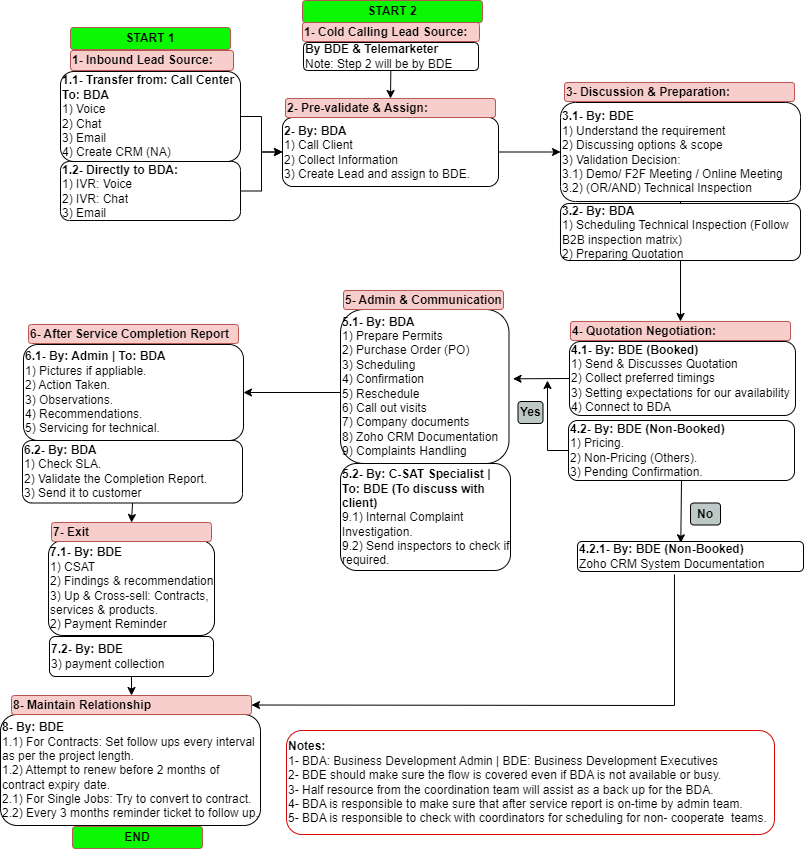
1- Lead Source

1- Inbound Lead Source: 

1.1- Transfer from: Call Center
To: BDA 
1) Voice
2) Chat
3) Email
4) Create CRM (NA)

1.2- Directly to BDA: 
1) IVR: Voice
2) IVR: Chat
3) Email


Click Here <PPT> for system reference - Page 26

4- Quotation Negotiation

4.1- By: BDE (Booked)
1) Send & Discusses Quotation
2) Collect preferred timings
3) Setting expectations for our availability
4) Connect to BDA


4.2- By: BDE (Non-Booked)
1) Pricing.
2) Non-Pricing (Others).
3) Pending Confirmation.

2- Pre-validate & Assign

1- BDA needs to pre-validate the lead by:
A) Asking set of admin questions.

B) Understanding Project Size & Type

C) Assign the lead according to Team skill-set

D) Follow Up Matrix


Click Here <PPT> for details

5- Admin & Communication

5.1) Single Jobs & Contracts: By BDA
1) Prepare Permits - Click Here
2) Purchase Orders (PO)
3) Scheduling
4) Confirmation 

5) Reschedule
6) Call out visits
7) Complaints
From 2 to 7 - Click Here 
8) Company Documents - Click Here
9 Zoho CRM Documentation

5.2- By: C-SAT Specialist | To: BDE (To discuss with client)
7.1) Internal Complaint Investigation.
7.2) Send inspectors to check if required.

3- Discussion & Preperation

By BDE:
1) Understand the requirement
2) Discussing options & scope

  • Method of Statements & Products -  Click Here
  • Pricing - Click Here
  • Here is the youtube playlist for Corporate videos for your reference - https://www.youtube.com/playlist?list=PLXaSPnbMEUDovxUuFEzeDc3E7K-5HY_6J 

3) Validating Decision

3.1) Demo/ F2F Meeting / Online Meeting
3.2) 
(OR/AND) Technical Inspection 

  • Inspection Forms - Click Here

By BDA:
To result in quotation/contract should be sent by BDE

4) Others:

  • Quotation - Click Here <PPT> Here <Folder>
  • Municipality Guidelines - Click Here
  • Company Documents - Click Here

5) Booking Technical Inspection - Click Here 

6- After Service

1- Admin team to send after service report to BDA:
A) Pictures if appliable
B) Action Taken.
C) Observations
D) Recommendations
E) Servicing for technical
2- BDA to revise and check the after service report.
3- All reports should follow the corporate form not the residential.
4- BDA to send the reports within a week via email to clients.
5- For contracts, BDA to send reports as per the frequency per service.
6- For PC & MS call out visits, BDA should make sure after service reports are sent within 2 days.
7- BDA to make sure that inspection forms of call outs should be signed from clients. (Email confirmation from client in case TL didn't get signature).
8- BDA must have a record of all visits per client on contracts.

6.2- By: BDA
1) Check SLA. (Completion Report should be ready and sent within 48 hours.)
2) Validate the Completion Report.
3) Send it to customer


Completion Reports & Contract - Click Here (Shared Folder.
Click Here - PPT

7- Exit

7.1- By: BDE
1) CSAT
2) Findings & recommendation 3) Up & Cross-sell: Contracts, services & products.
2) Payment Reminder


7.2- By: BDE
3) payment collection

8- Maintain Relationship

8- By: BDE
1.1) For Contracts: Set follow ups every interval as per the project length.
1.2) Attempt to renew before 2 months of contract expiry date.

2.1) For Single Jobs: Try to convert to contract.
2.2) Every 3 months reminder ticket to follow up.

9- Others

BDE Communication Matrix - Click Here

THH MSDS for Treatment Products - Click Here

Zoho Projects for internal communication - Click Here

BDA KPIs - Click Here

1-Prepartion Phase
 By BDE

1- Collect Info:

A) Type & Sizes of Property

B) Number & Type of Unit if possible. 

C) Drawing if possible 

D) If they have specific frequency for cleaning .

E) Type of cleaning (Coil included or not)

F) Check with the client when we can do inspection if any permit needed.

2- Book inspection (Help by BDA):
KPIs: A) First priority for inspection is maintenance team and second priority is inspection team. 
B) Same day response time
C) 1 hour standard duration

3- Meet client:
Note: Based on BDE judgment or evaluation, they need to go as well.

4-External Approval Phase
 By BDE

1- Send the email to the client copying in cc: BDM & BDA (attaching contract that includes follow up matrix).
Click Here for Email Template
2- The client should reply back with:
A) Approval.
B) LPO / signed contract is a must.
Note: 
BDE to send the task in Zoho Project attaching the contract for the BDA to follow up

2- Inspection & Evaluation Phase
 By Field Operations

1- Evaluation/Inspection
2- Send the form.
KPIs: Next Day to Admin and prepare for BDA (BDA Owns follow up)

A) Count of Units

B) Type of Units

C) Recommended Scope (Ladder, proper timings to work... etc.)

D) Preferred Timings

E) Confirm needed permits

5- Contract Phase
​By BDE/BDA​

By BDE:
1- BDE to introduce BDA in email:
1.1 - Thanking the customer 
1.2- Signing back the contract & Stamp and attach.
1.3 - introducing BDA to be main contact person for:
Click Here for Email Template

By BDA
A) Arranging schedule. 
B) Confirmation of visits: To be done by end of month for the whole next month.
C) Arranging permits 
D) Sharing after service reports. 
E) Support with any emergency or call out visits. 
1-  Share a link for payments information
(Click Here for Payment Registration Details + Click Here for QR Code)
2- Share the schedule for the whole year + Contact Details
Click Here to edit the template
KPIs: Attach Schedule Sample + Communication Matrix (Placing the same in CF after client approval and create Zoho CRM deal as well.
KPIs: The booking should have a clear information about scope, number, and type of units in the description.
3- Share all documents for permits: Bayzat (Documents for teams: Passport, visa copy, trade license, car registration... other as per the requirement) 
4- Forward any inquiry to BDE from client related to the sales part. (Source from recommendation (Proactive) or requested directly from client).

Click Here for details

3- Internal Approval Phase
 By BDA

1- Prepare the contract - Click Here

2- Send it and attach contract & Inspection for approval by managers:

A) Technicality by Operation Manager.
B) Pricing by Business Development Manager.
Both by using email.
3- Share it with BDE after all necessary approvals.

5.1- Contract Phase
 By Operations & Admin

By Operations:
1- Carry out all PPM visits as per the scope on the system.
2- Share service report + clear pictures for all components for all units 
2.1- one general report for the visit.
2.2- a report for each unit including the number of unit and the location of the unit. 
2.3- Fill check list based on the scope in the contract.
2.4- Label every and each unit with a coding system
2.5- Separate inspection form incase a separate work needs to be done (Scope outside of the contract + part replacement).

By Admin:
1- Prepare the report.
2- Share it with BDA
KPIs: 
BDA responsible on sharing the report within a week max

By BDA:
1- Send the report to the client 
2- Keep a record of the visit - Click Here
3- Responsible to fill the contract tracker - Click Here

General KPIs

1- In case the schedule job got canceled or client didn't confirm, BDA responsible to reschedule it again.

2- In case if there is more than one visit not paid in the system (CF), BDA should alert BDE for collection.

3- Professionalism: Following standard templates for email communication with clients

4- Booking on the system should match the contract (Duration, pricing as well description should be correct.

Zuper Manual

Click Here To Access

Video Links:

Click Here To Access